George's Notes on GPS Navigation for Cyclists
Keywords: open source GPS, cycle route planning, Garmin Edge 205 305 605 705 800, Garmin ForeRunner
Previous title: GPS navigation on George and Jean's Brittany 2008 Tandem Tour
Getting Sustrans National Cycle Network routes as GPX files
Posted July 2011
This forum post explains how to download GPX files for almost all the Sustrans National Cycle Network routes (i.e. those mapped as 'NCN xx') from OpenStreetMap. This could be an invaluable new resource. Download GPXs for the all the NCN routes in the area you want to cycle, load them into your Garmin (see below) and you should be able to tour with certainty of staying on the NCN routes.
I haven't yet tried using any of the routes obtained in this way. There seem to be some problems in the ordering of the points - they don't always form a contiguous route, I intend to investigate whether this can be sorted out. Meanwhile, use this tip with caution.
Here are a couple of related tips:
- The Garmin 605/705 doesn't seem to be able to navigate a GPX route in reverse, so you'll need to reverse the route using gpsies.com or a similar tool.
I normally do that for all the NCN routes I'm planning to use and load both versions into the Garmin.
-
Most of the NCN routes derived from OpenStreetMap contain more than 1000 points, which isn't admissable on Garmin Edge devices. You must reduce the number of points by loading the route into gpsies.com and then re-downloading using the gpsies.com options to reduce the size of the route.
Planning and navigating day-ride routes using cyclestreets.net and a GPS
Posted August 2010
The CycleStreets journey planner is a popular UK-based cycle route planning tool that plans excellent A to B journeys using algorithms that exploit the increasingly useful detailed data on the road network that is available in the OpenStreetMap database.
I have been experimenting with using journeys planned by CycleStreets as leisure rides with the aim of finding pleasant low-traffic routes in parts of the country with which I'm not very familiar. By using CycleStreets I was hoping to substantially reduce the time taken to plan my leisure rides.
My previous method for planning such rides was to use heavily-modified versions of the Google Maps 'Driving Directions' as described in earlier posts below. Although that method produces good routes when used carefully, it is time consuming and involves a lot of route tweeking.
My experience to date with using the CycleStreets journey planner (for two rides of about 40 miles) is mainly very good, so I think it's worth describing the experience here.
Creating the route
Since the CycleStreets journey planner is intended for planning A to B journeys, leisure rides must either be one-way with a return by train, or you must return by the outward route. Another option would be to plan a 3-legged triangular route.
Here are the steps I follow with the CycleStreets journey planner:
- Choose a starting point - I generally choose an out-of-town station that's less than an hour's train journey from my home
- Choose a destination at the distance you want to ride and in an area that you're interested in crossing. I generally choose a destination that has a rail station that's good for the journey home. You'll have to make a guess at the likely length of the journey - if the result is wrong you can always try again.
- Request a 'Balanced' route. 'Quiet' is another option, but the CycleStreets router seems to include quite long 'dismount' sections in its Quiet routes.
- If you don't like the look of the route, try a slightly different start or finish point, or consider a 2- or 3-part route (i.e. by planning 2 or 3 separate journeys).
- Once I have got a route I want to ride, I use one of these options:

to save the route on my computer. Actually I use the last option to get the route stored on my account at gpsies.com because that's a cloud service that offers a variety of tools for modifying routes. Then I use the 'Download GPX Track' feature of gpsies.com to get a track file that's suitable for loading into my Garmin Edge 605 (see the notes below under April 2010 for more details).
Following the route
Even though I have become used to following routes on my GPS device, I think it's important to carry a map. That's because (a) it's helpful and interesting to see more than the small display of the GPS can show you and (b) many things can go wrong with the GPS navigation, from a flat battery to a poorly chosen route and it's important to have a fallback navigation system. But much of the time I find it's quite satisfactory to follow the route on the GPS screen, with an occasional glance at the map to give a wider context.
Here are some comments on the experience in more detail. This part is largely specific to the Garmin Edge 605 (and other Garmin devices in the same family). For maps on my Edge 605 (described below) I have the base map and one of the following more detailed map options - the Garmin 'Topo' map or the recently-available OpenCycleMap Garmin Maps. I'll describe the experience of navigating with each of these options.
Once a route is loaded as a GPX file in the Garmin, use 'Where to>Saved rides' to select the file (note the displayed names are from the XML <name> element in the file, not the file name). Then choose 'Navigate'. The device should then display the planned route as a magenta-coloured line superimposed on the map.
A. Using the Garmin 'Topo' map (or just the base map):
These maps consist entirely of rendered map images, without any locations, vector data, street names, etc. Therefore the navigation process is fairly basic. It was probably designed for off road and cross-country riders and walkers. The process is:
- The map is moved to keep your position in view.
- When you are on or near the planned route whenever a change of direction is coming up (not necessarily at a junction, every curve in the road is indicated), the current map segment with the overlayed magenta line is enlarged and a text instruction such as "In 50 metres go northeast" is attached.
- Other screens are available that show your current direction and the direction you should be going to follow the route, a list of direction changes coming up and the usual 'cycle computer' type info.
I find this apparently basic method of navigation quite useful. It is unobtrusive and fault tolerant - if you choose to diverge from the planned route it stops issuing instructions but still shows where you are and displays the Topo map.
B. Using the OpenCycleMap Garmin Maps:
These maps are derived from the excellent 'crowd-sourced' Open Street Map, which is now virtually complete, at least for the UK. Furthermore, they seem to include the vector and textual information necessary to support 'turn-by-turn' navigation on Garmin devices (as do the Garmin City Navigator Maps). In my opinion this is a mixed blessing, for reasons explained below. First I'll describe the process:
- The map is moved to keep your position in view.
- When you reach about 400 m from a junction where your route takes a differently-name road, the Garmin gives precise instructions with arrows overlaid on the map showing the exact manoeuver.
- If you diverge from the planned route by as little 50 metres, it goes into a 'Calculating' mode, which freezes the screen for 60 seconds or more and sometimes doesn't terminate.
- If it terminates the 'calculation', it tries to advise how to get back onto the planned route, almost alway unhelpfully! If it doesn't terminate you have to Cancel the calculation and then restart the navigation mode. (Update: I have now discovered how to turn the route re-calculation function off: it's under Settings>Routing where you can choose 'Automatic', 'Prompted' or 'Off'. Choosing 'Prompted' or 'Off' avoids this problem.)
- Other screens are available that show your current direction and the direction you should be going to follow the route, a list of direction changes coming up and the usual 'cycle computer' type info.
This navigation mode may be appropriate for getting from A to B in a city, but it is over-prescriptive and a little annoying for leisure cycling. And as far as I know there is know way to turn off the 'turn-by-turn' mode and revert to the 'Topo mode' as described under A above. (See the update above on turning off automatic route recalculation. I'm now happier with the turn-by-turn mode of navigation.) It is a particular problem when the usually reliable OSM/OpenCycleMap data is wrong. On one occasion I got 'Navigation error - no road'! After that, it did revert to the 'Topo' type of navigation, which was actually more useful.
That's about all for now. I'll post updates as I discover more.
Notes on converting Google directions to a .gpx file for navigation as a 'Saved Ride' on Garmin Edge 205/305/605/705 GPS devices
Posted April 2010
- The file has to be a GPX Track <trk> and not a Route <rte> (this seems odd since <rte> is the XML format normally used for planned routes, but that's my experience).
- It must contain no more than 999 points - else the stupid device gives up on drawing and navigating the route.
- You can use the http://www.gpsies.com/ converter page to convert between most formats. It has options to control the max number of points in the result - set the number to 975 and turn on the 'simplify' option.
- To create a .gpx from a set of Google directions, use Google's Driving Directions, but modify them by dragging the line to the roads you like the look of. When your happy with it, use the 'save to my maps' link at the bottom of the directions list. Then follow the link to My Maps and click to display your new route.
- Use http://www.takitwithme.com/ to make a GPX track from a route drawn on Google MyMaps. Paste the URL from the Link tab of MyMaps to the url box in http://www.takitwithme.com/ . You will probably then need to process the resulting .gpx file through http://www.gpsies.com/ to ensure that it obeys the Garmin constraints listed above.
- You can also use http://www.gpsies.com/ converter page to make a GPX track from a .tcx file (as generated by the Garmin device).
Addendum for UK cyclists:
Using cyclestreets.net
routes on Garmin devices
Cyclestreets.net
offers excellent routes throughout the UK, taking account of cycling conditions, gradients and much more. It includes a facility to download a route as a .gpx file for loading into Garmin or other GPS devices, but for the above-mentioned Garmins (Edge 205/305/605/705) the requirements listed above apply. I.e. you should use the http://www.gpsies.com/ converter page to constrain the size and convert the <rte> format produced by CycleStreets to <trk>.
GFC
26/4/2010
Posted October 2008
I have been fighting with online mapping systems and GPS devices for 2-3 years with the aim of using a GPS for navigation on our annual cycle tours. Until this year, none of them has come near to meeting our needs and we have fallen back on paper-based maps with daily routes pre-planned and traced with a highlighter.
I've now finally found a system that meets almost all our needs and I'm writing it up here in case it is of interest to others.
It is based not only on a specific GPS but relies also on the use of Google Maps for route planning as well as several web-based open software tools for file conversion.
Our requirements are:
- A handlebar-mounted GPS that is robust, waterproof and has the battery capacity for > 8 hours of use and the memory capacity to store all the maps, planned routes and route logs for at least two weeks' of cycle touring.
- The GPS needs to show a legible map overlaid with a route in the context of the adjacent roads and geographic features, preferably including contours and heights.
- The ability to plan routes that follow exactly the roads that we want to ride and pass through all the places we want to visit.
- Logging of the routes actually ridden, with the intention of displaying them in Google maps on return and/or using them for 'geotagging' the photographs taken throughout the tour.
We chose a Garmin Edge 605 bicycle-specific GPS, but we used almost none of the PC/Mac software that Garmin supply for use with it. Nor did we use the GPS's built-in route planning feature - I don't think it can provide the type of routing that is conducive to enjoyable cycle touring.
Instead we used Google Maps 'Get directions' with the 'Walking' option to generate each day's route. The basic routes generated by Google's router were heavily modified interactively using Google's brilliant 'dynamic routing' feature which allows any part of the route to be dragged to follow any road and/or pass through any point on the map. The route 'snaps onto' roads in a very impressive and intuitive manner. It takes us only a few minutes to create a route for each day following the most attractive-looking roads and passing through exactly the places we want to visit.
The colour screen of the GPS renders whatever pre-loaded maps it contains in a legible manner, but the screen's small size is inadequate for getting an overview of the day's route for planning stops or making changes to the route. Our solution to this was to carry the relevant pages from a Michelin 1:200,000 Road Atlas which were displayed on top of a handlebar bag.
Equipment and Maps 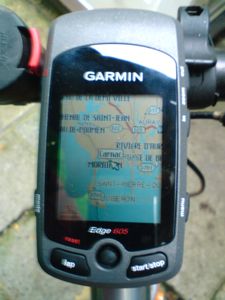
- Garmin Edge 605 Bicycle GPS (500MB internal memory, 1 GB SD card). Battery life > 15 hours.
- Digital topographic maps installed in the Garmin covering the area(s) we toured. We used the IGN TOP25 digital topographic map for our tour of Brittany. It shows the tiniest roads, many tracks and footpaths and has contour lines at 50m intervals.
You can obtain topographic maps for the UK, France and some other European countries from Garmin or their retailers, either pre-installed on SD cards, supplied on CD/DVD or downloadable. In the latter case you have to use Garmin's not-very-intuitive tools to install the maps for the areas you will visit. I installed them onto a separately-purchased blank 1 GB SD card. This card provides adequate space to install maps for all the areas we are likely to visit in the foreseeable future.
It's worth noting that OpenStreetMap is becoming a useful source of free mapping that has been ported to the Garmin, at least for some areas. Caveat: I have not yet tried these on my Edge 605. If you have, please report on it in the comments to this page.
Making our daily routes and installing them in the Garmin
1. Use Google maps 'get directions' with the 'walking' option and then employ 'dynamic routing' to make a route for each day's ride that follows attractive routes on the smallest available roads. Avoiding hills is another possible aim, but it requires a map with contours or some other means of profiling the route. Google Maps does not yet provide that. Google Maps Terrain view now includes contours. I'm looking forward to using that on our next tour.
2. Extract the Google Maps route and convert it to a GPX file using the script described at:
http://www.bikely.com/forum/discussion/1377/google-maps-new-dynamic-routing-good-for-bicycle-routes/
which is aimed at Bikely users, but I got good results using it to make files for the Garmin. I used the 'Bikely GPX option'. I haven't tried the 'Garmin Course' option. But I did use the 'Cue Sheet' feature to get printed Cue sheets with details of all the turns. These were used occasionally along the way to clarify things.
Another relevant tool for this conversion is described at:
http://www.elsewhere.org/journal/gmaptogpx/
You have to copy and paste the GPX text produced by either of these scripts from a browser window into a text editor, then save it with a meaningful name and a .gpx postfix so you'll be able to find it on the Garmin.
3. Copy all the GPX files into the Garmin/GPX folder in the Garmin's internal memory or the folder with the same name on the SD card. (The GPS can use them in either place).
4. To navigate using one of the routes, use the Where To?>Saved Rides menu on the Garmin to select a route from those you will see listed. When you return to the GPS map view you will see a pink/mauve coloured line showing your route overlaid on the map. When you are following the route you will get a prompt on the screen for every change of direction.
If you diverge from the route, the Garmin will continue to track your position on the map and log your route (if the logging feature is turned on, see below). When you rejoin the planned route the directional prompts will resume.
Logging routes and converting log files for display on a Google map
- The Garmin does a good job of making a log of each day's ride. Just press the 'start/stop' button before you set off. The log will be terminated when you turn the Garmin off, or when you use the 'reset' button. The logs are stored in the Garmin's internal memory in the folder Garmin/History with files named by the date time when they started. E.g. '2008-09-21-07-33-37.tcx'.
- The .tcx file format used for logs is a Garmin-proprietary XML dialect intended for use with the Garmin Training Center software. But it is possible to convert tcx files to the KML format, which can be imported into Google Maps and Google Earth. I found the most reliable and effective converter is the online one offered at: GPSies.com. If you plan to import the KML tracks into Google Maps it's a good idea to use the converter's Track simplification option and to reduce the number of points to about 200-400 per day using the slider on the converter page.
- If you want to see a height profile of the route and various statistics such as total distance, total climbing, etc., load the GPX file you have generated back into GPSies.com's track library (you have to register and then use the Upload page). This method for getting statistics and profiles will work with any GPX file, whether a planned route or a log of ridden route.
We obtained this excellent record of our recent tour of Brittany using the above method.
Drawbacks
Topographic maps don't support route planning on the Garmin itself. Any routes planned while on tour using the Garmin will be based only on the built-in Base Map of Europe which includes major roads only which are generally unsuitable for cycling. This was problem for us when we hadn't planned our routes through two cities in sufficient detail. We made the Garmin plan routes for us on the fly, but the results were neither short nor quiet.
It may be possible overcome this problem by installing the Garmin City Navigator Europe maps in addition to the topographic maps. But we didn't do that because we prefer the more open and flexible approach to route finding based on pre-planned routes made using Google Maps.
Conclusion
This was the first of the 20 or so cycle tours we have completed on which we never lost our way nor had to stop to work out where we were. The Garmin Edge 605 deserves a large chunk of credit for this - it's a very well engineered device with impressive GPS positioning performance.
We were less impressed with Garmin's supporting software and we were very pleased to find that the Internet community has supported digital mapping to such an extent that made it possible to follow the more open approach described above. We're very grateful to the Google Maps team and to the developers of the other software tools mentioned above.
George Coulouris, October 2008, revised January 2009, May 2009, April 2010
Comments
